4CCSAPPA Programming Practice and Applications Coursework 3: Predator/Prey Simulation
Hello, dear friend, you can consult us at any time if you have any questions, add WeChat: daixieit
4CCSAPPA Programming Practice and Applications
Coursework 3: Predator/Prey Simulation
Your task is to extend a predator/prey simulation. You must use the foxes-and-rabbits project, provided on KEATS, as the basis for your project. Note that this version of the foxes-and- rabbits project is slightly diferent from the version in the textbook, so please use the version from KEATS, not from the textbook. You must replace the Fox and Rabbit classes with diferent kinds of predator and prey to simulate a new food chain.
1 Getting Started
Take a few minutes to study the base code. To run the simulation, right-click on the SimulatorView class and click ‘Run JavaFX Application’. A new window should appear, similar to Figure 1. Call void simulate(int numStep), on the SimulatorView object to run the simulation.
You may change any of the classes/methods and add your own classes. However, the project should remain a JavaFX project and void simulate(int numStep) should allow a user to run the simulation.
Make sure you understand...
• How simulations are executed and the main simulation loop?
• The animal class structure.
• What occurs on each simulation step?
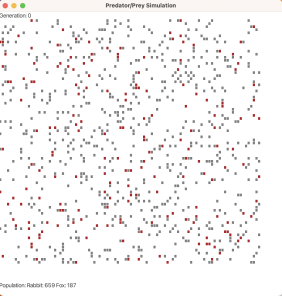
Figure 1: Simulation window for the basic Predator/Prey project.
2 Requirements
2.1 General Requirements (50 points)
1. Your simulation should have at least five diferent acting animals. At least two of these should be predators (they eat another species), and at least two of them should be prey (they eat plants).
2. Simulate plants. At the start of the simulation, plants should appear in any cell that isn’t occupied by a predator or prey. Plant cells should be green. Plant cells are considered free cells and can be replaced by newborn predators or prey. Dead animals should be replaced with plants.
3. Predators should compete for the same food source, i.e., predators eat prey.
4. All prey eat plants and have a food value. For example, currently the food value of the rabbit is 9 units.
5. Simulate disease. Some animals occasionally become sick. Once sick, the animal should remain alive for a fixed number of steps (you decide how many time steps). Disease can spread to other animals of the same species. Implement disease as a boolean variable that becomes true when the animal is sick.
2.2 Natural Selection (30 points)
Natural selection is the process that causes species to change over time in response to their environment. You will simulate natural selection in your project using elements of evolutionary algorithms. More specifically, you will add a genetic component to the project and implement a mating operation (with mutations).
Currently, an animal’s life cycle, such as breeding age & life span, are controlled by constants. Modify your code so that all animals have a gene that controls their life cycle. The gene will determine the following variables:
• breeding age —the age the animal can begin mating. It must be a value between 12 and 90 (inclusive)
• life span —currently set to 120, it must be a value between 10 and 120 (inclusive). It’s possible that some animals will not be able to breed.
• breeding probability —the probability that an encounter with another member of the same species will result in reproduction; a value between 0 and 0.50
• litter size —a number between 1 and 12 (inclusive); litter size applies to birthing animals only.
• disease probability —the probability that an animal becomes sick. This is a value between 0 and 0.5
• metabolism —this value is implied in the base code, i.e., one food unit is subtracted from foodLevel in each step. Metabolism will be a value between 0.25 and 1 (inclusive), simu- lating animals with a slow metabolism that needs fewer meals. Note, metabolism will be subtracted from foodLevel instead of a fixed value.
Every animal has a gene. The gene is a string of 14 integers. These integers will determine the values for the different stages of the animal’s life cycle and metabolism. For example, the gene 15086350812080 should produce the following values:
breeding age 15
life span 86
breeding probability 0 .35 litter size 8
disease probability 0 . 12 metabolism 0 .8
Only the very first population should have randomly assigned genes. Also, you must make sure that the gene produces values that are within the limits set in this task sheet.
All future animals will be produced through mating, specifically, using a crossover operation. All animals should be designated as male or female (assume there’s a 50% chance of being male or female for all animals). Animals can only mate when a male and female meet (meet means they are in neighbouring cells). Offspring will have half of their genetic material come from the female parent and the other half from the male parent. For example, if parent one’s gene is 15086350812080 and parent two’s gene is 13043500323040, then all the children in the litter will have a variant of the gene 15086350323040 —the first seven integers are from parent one and the last seven are from parent two. Finally, you’ll use a mutation operation to make unique genes for each offspring: you’ll decide to mutate an integer in the gene with probability 20%. If the integer is chosen for mutation, 50% of the time you will add one and 50% of the time subtract one.
2.3 Report (10 points)
Write a short report (no more than four pages long with title page), containing the following:
• Your name and student number
• A description of your simulation, including the types of species that you are simulating, their behaviour and interactions.
• A list and description of all extension tasks you have implemented.
3 Submission (10 points)
• You’ll submit a zip file containing the following
1. A Jar file of your BlueJ project. —You can create a Jar from within BlueJ by going to Project, and then “Create Jar File...” . You do not need to change any of the default options, and so you should just click the “Continue” button. The Jar file must contain your source code, i.e., the *.java files, and it must run on BlueJ.
2. All of your Java files (*.java)
3. Report (as a PDF)
• Your assignment will be penalised if you are missing any files or included files that were not asked for in the task sheet.
• Click the submission link to submit your work. Follow all instructions in the ‘Student Submission Guide’. If you have any trouble submitting your work, email Jeffery Raphael as soon as possible. Do not wait until the last hour to attempt your first submission.
4 Deadline & Late Submissions
You must submit your assignment on Gradescope via KEATS by Wed., Feb. 25th 16:00 (4pm).
All coursework must be submitted on time. If you submit coursework late and have not applied for an extension or have not had a mitigating circumstances claim upheld, you will have an automatic penalty applied. If you submit late, but within 24 hours of the stated deadline, the work will be marked, and 10 raw marks will be deducted. If this deduction brings your mark below the pass mark (40%), your mark will be capped at the pass mark. All work submitted more than 24 hours late will receive a zero.
5 Mark & Feedback
Grades and feedback will be posted on Gradescope by midnight on Wed., Mar. 25th. After marks have been released, please check that your submission has been graded & you’ve been given credit for all completed tasks. Make sure to read the marking rubric to understand how assignments are marked. If you have any questions about your mark or feedback, speak to your TA.
2026-02-25