CSCI-561 - Spring 2025 - Foundations of Artificial Intelligence Homework 2
Hello, dear friend, you can consult us at any time if you have any questions, add WeChat: daixieit
CSCI-561 - Spring 2025 - Foundations of Artificial Intelligence
Homework 2
Due October 28, 2025, 23:59:59 PST
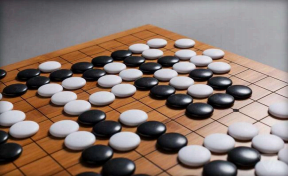
1. Overview
In this programming assignment, you will develop your own AI agents based on some of the AI techniques for Search, Game Playing, and Reinforcement Learning that you have learned in class to play a small version of the Go game, called Go-5x5 or Little-Go, that has a reduced board size of 5x5. Your agent will play this Little-Go game against some basic as well as more advanced AI agents. Your agents will be graded based on their performance in these online game “tournaments” on Vocareum.com. The objective is to develop and train your AI agents to play this Little-Go game as best as possible.
2. Game Description
Go is an abstract strategy board game for two players aiming to surround more territory than the opponent. The basic concepts of Go (Little-Go) are very simple:
- Players: Go is played by two players, called Black and White.
- Board: The Go board is a grid of horizontal and vertical lines. The standard size of the board is 19x19, but in this homework, the board size will be 5x5.
- Point: The lines of the board have intersections wherever they cross or touch each other. Each intersection is called a point. Intersections at the four corners and the edges of the board are also called points. Go is played on the points of the board, not on the squares.
- Stones: Black uses black stones. White uses white stones.
The basic process of playing the Go (Little-Go) game is also very simple:
- It starts with an empty board,
- Two players take turns placing stones on the board, one stone at a time,
- The players may choose any unoccupied point to play on (except for those forbidden by the “KO” and “no-suicide” rules).
- Once played, a stone can never be moved and can be taken off the board only if it is captured.
The entire game of Go (Little-Go) is played based on two simple rules: Liberty (No-Suicide) and KO. The definitions of these rules are outlined as follows:
Rule1: The Liberty Rule
Every stone remaining on the board must have at least one open point, called a liberty, directly orthogonally adjacent (up, down, left, or right) or must be part of a connected group that has at least one such open point (liberty) next to it. Stones or groups of stones which lose their last liberty are removed from the board (called captured).
Based on the rule of liberty, players are NOT allowed to play any “suicide” moves. That is, a player cannot place a stone such that the played stone or its connected group has no liberties unless doing so immediately deprives an enemy group of its final liberty. In the latter case, the enemy group is captured, leaving the new stone with at least one liberty.
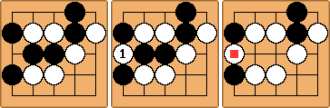
Examples of capturing:
- Example 1. The white stone is captured after Black plays at position 1 because its directly orthogonally adjacent points are occupied.
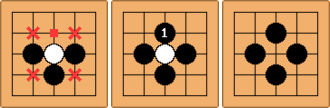
- Example 2. The 3 white stones are captured as a connected group.
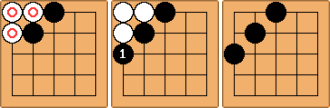
- Example 3. The two groups of white stones are captured.
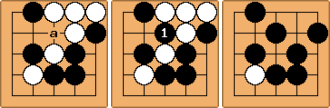
- Example 4 (Special example). This example illustrates the rule that a capturing stone need not have liberty until the captured stones are removed.
Rule 2: The “KO” Rule
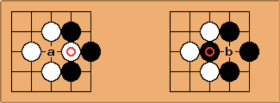
For the position shown on the left board above, Black can capture the  stone by a play at position a. The resulting position is shown on the right board above. Without a KO rule, in this position, White could recapture the
  stone at position b, reverting to the position shown on the left, and then Black could also recapture. If neither player gave way, then we would have Black a, White b, Black a, White b, ..., repeated ad infinitum, stalling the game Is progress. This situation is known as KO.
The KO rule resolves the situation: If one player captures the KO, the opponent is prohibited from recapturing the KO immediately.
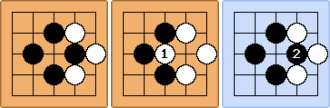
- Example. Given the initial status on the left below, the white player puts a stone at position 1, which captures a black stone. Black stone cannot be placed at position 2 immediately after it’s captured at this position. Black must play at a different position this turn. Black can play at position 2 the next turn if this position is still not occupied.
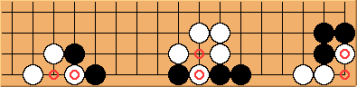
- More examples. KOs need not occur only in the center of the board. They can also show up at the sides or corners of the board, as shown in the diagram below.
Komi
Because Black has the advantage of playing the first move, awarding White some compensation is called Komi. This is in the form of giving White a score compensation at the end of the game. In this homework (a board size of 5x5), Komi for the White player is set to be 5/2 = 2.5.
Passing
A player may waive his/her right to make a move, called passing, when determining that the game offers no further opportunities for profitable play. A player may pass his/her turn at any time. Usually, passing is beneficial only at the end of the game, when further moves would be useless or even harmful to a player's position.
End of Game
A game ends when it reaches one of the four conditions:
- When a player’s time for a single move exceeds the time limit (See Section 6. Notes and Hints).
- When a player makes an invalid move (invalid stone placement, suicide, violation of KO rule).
- When both players waive their rights to move. Namely, two consecutive passes end the game.
- When the game has reached the maximum number of steps allowed. In this homework (a board size of 5x5), the maximum number of steps allowed is (5*5)-1 = 24.
Winning Condition
There are various scoring rules and winning criteria for Go. But we will adopt the following rules for the scope of this Little-Go project.
- “Partial” Area Scoring: A player Is partial area score is the number of stones that the player has occupied on the board.
- Final Scoring: The Black player’s final score is the partial area score, while the White player’s final score is the sum of the partial area score plus the score of compensation (Komi).
- Winning Criteria:
- If a player’s time for a single move exceeds the time limit (See Section 6. Notes and Hints), s/he loses the game.
- If a player makes an invalid move (invalid stone placement, suicide, violation of KO rule), s/he loses the game.
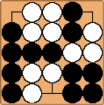
- If the game reaches the maximum number of steps allowed or if both players waive their rights to move, the winner is the player that has a higher final score at the end of the game. For example, in the following board at the end of a game, White’s partial area score is 10, and Black’s partial area score is 12. White is the winner because 10 + 2. 5 = 12. 5 > 12.
Clarification of the Game Rules
The particular set of rules adopted in this assignment references several popular rule sets worldwide, but some changes have been made to best adapt to this project. For example, “Full” Area Scoring is usually used in the 19x19 Go game, which counts the number of stones that the player has on the board plus the number of empty intersections enclosed by that player Is stones, but we do not use this rule in our assignment. Go is a very interesting and sophisticated game. Please do some more research if you’re interested.
3. Academic Honesty and Integrity
All homework material is checked vigorously for dishonesty using several methods that compare the submissions with previous semesters and similar codes on the internet, including GitHub and other platforms. All detected violations of academic honesty are forwarded to the Office of Student Judicial Affairs. To be safe, you are urged to err on the side of caution. Do not copy work from another student or off the web. Keep in mind that sanctions for dishonesty are reflected in your permanent record and can negatively impact your future success. As a general guide:
Do not copy code or written material from another student. Even single lines of code should not be copied.
Do not collaborate on this assignment. The assignment is to be solved individually.
Do not copy code off the web, including Github. This is easier to detect than you may think.
Do not share any custom test cases you may create to check your program’s behavior in more complex scenarios than the simplistic ones that are given.
Do not copy code from past students. We keep copies of past work to check for this. Even though this project differs from those of previous years, do not try to copy the homework solutions from the previous years.
Do not post on Piazza asking how to implement some function for this homework or how to calculate something needed for this homework.
Do not post code on Piazza asking whether or not it is correct. This is a violation of academic integrity because it biases other students who may read your post.
Do not post test cases on Piazza asking what the correct solution should be.
Do ask the professor or TAs if you are unsure about whether certain actions constitute dishonesty. It is better to be safe than sorry.
4. Playing against Other Agents
In this homework, your agent will play against other agents created by the teaching staff of this course.
4.1 Program Structure
Figure 1 shows the basic program structure. There is one game host and two players in each game. The Game Host keeps track of the game process, gets the next moves from the players in turn, judges if the proposed moves are valid, wipes out the dead stones, and finally judges the winner. Each of the two
Players must output its next move in an exact given format (in a file called output.txt) with the intended point (row and column) coordinates to the Game Host. A player Is task is very simple: take the previous and current states of the board (in a file called input.txt) from the host and then output the next move back to the host.
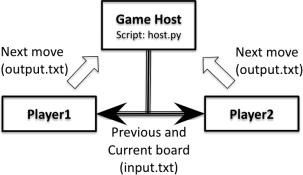
Figure 1: The Program Structure for the Little-Go Game.
4.2 Rule Parameters
The following parameters have been adopted for this homework project:
- In a board, 0 stands for an empty point, 1 stands for a Black stone, and 2 stands for a White stone.
- In board visualizations, X represents a Black stone, and O represents a White stone.
- Black always plays first.
- The board size is 5x5.
- The maximum number of moves allowed is (n * n) − 1, where n is the size of the board. For example, the maximum number of moves allowed for a board of size 5x5 is (5*5)-1=24.
- Komi for the White player is n/2. For example, Komi for a board of size 5x5 is 2.5. If White scores 10 and Black scores 12 at the end of the game, then White is the winner (10 + 2. 5 = 12. 5 > 12).
4.3 The Game Board
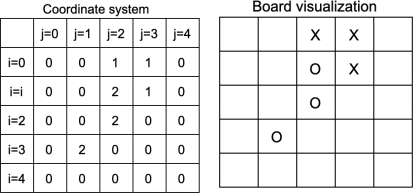
Figure 2: The Format of the Current Board of the Little-Go Game.
The host keeps track of the game board while the two players make moves in turn. We will use a zero-based, vertical-first, start at the top-left indexing in the game board. So, location [0,0] is the top-left corner of the board, location [0,4] is the top-right corner, location [4,0] is the bottom-left corner, and location [4,4] is the bottom-right corner. An example of game state is shown in Figure 2, in which "1" denotes black stones, "2" denotes white stones, and "0" denotes empty positions. For manual players, we visualize the board as in the image on the right, where X denotes the black stones and O denotes the white stones.
4.4 Players and Game Host
AI Players
Different AI Players are available for your agent to play against for the purpose of testing and/or grading. Examples of these existing AI players include:
- Random Player: Moves randomly.
- Greedy Player: Places the stone that captures the maximum number of enemy stones
- Aggressive Player: Looks at the next two possible moves and tries to capture the maximum number of enemy stones.
- Alphabeta Player: Uses the Minimax algorithm (Depth<=2; Branching factor<=10) with alpha-beta pruning.
- QLearningPlayer: Uses Q-Learning to learn Q values from practice games and make moves intelligently under different game conditions.
- Championship Player: This is an excellent Little-Go player adapted from top-performing agents in previous iterations of this class.
Manual Player
To familiarize yourself with the game rules, you can manually play this game on Vocareum as “Player1” against a chosen agent “Player2” (e.g., the Random Player). When there is at least one manual player, the game board will be visualized. On Vocareum, please click the “Run” button to play a YouSelf-vs-RandomPlayer game. You are highly encouraged to do this to get acquainted with how the game works. In case you face issues with the button, please run “bash ../resource/scripts/run.sh” in the terminal to perform the same action.
Your Programed Agent Player
You will need to write your own agent for this project. Name your agent as my_player.xx, where xx is the conventional extension used in homework 1 (See Section 6 Notes and Hints), and upload your my_player.xx into the work directory on Vocareum. Then, when you click the “Submit” button, your uploaded agent will be called by the Game Host to play against the random player, the greedy player, and the aggressive player. The results of these games will also be reported.
The Game Host
The Game Host integrates the Go game with the players. During a gameplay process, the Game Host will perform the following steps:
Loop until the game ends:
- Alter the CurrentPlayer
- Clean up any input.txt and output.txt in the player’s directory
- Provide the current and previous game boards by creating a new input.txt (see format below)
- Call the CurrentPlayer’s agent, which reads input.txt and creates a new output.txt
- Validate the new output.txt and process the proposed move
- The validity of your move will be checked. If the format of output.txt is incorrect or your move is invalid as per the rules of the game, your agent loses the game.
- Check if the game has ended. If so, the winning agent is declared.
For testing purposes, your agent can play this game on Vocareum against one chosen (The Random Player) AI agent. On Vocareum, please click the “Build” button to play a YourPlayer-vs-RandomPlayer game once you have my_player.xx uploaded into the “work” directory. If you face issues with the button, please run “bash ../resource/scripts/build.sh” in the terminal to perform the same action.
To help you get started, the basic source code (in Python) for playing the Little-Go game (i.e., the host, the random player, and the read and write functions) are available for you to see. You can download them from HW2/stage1/resource/$ASNLIB/public/myplayer_play onto your local machine and play there. For example, you can:
- Duplicate random_player.py and rename one copy to my_player3.py,
- Download build.sh to the same directory, modify line 36: prefix="./",
- Start a game between two random_players on your machine using the following command:
$ sh build.sh ( or $ bash build.sh)
On Vocareum, you can do the same by copying random_player.py into your work directory, renaming it as my_player3.py, and then clicking on “Build” for the two random_players to start playing against each other. You may re-use the provided convenience functions in host.py, read.py, etc; however, it is your responsibility to make sure that your program runs correctly.
5. Project Instructions
5.1. Task Description
Your task is to implement your agent in my_player.xx. Note that in the grading competitions, your agent will play against other chosen agents, so it is important that your agent inputs and outputs in the exact same format as specified. Other helper files (either .json or .txt) or scripts are acceptable, such as files to store Q-value tables or other types of helper functions. These are optional. Please note that only source code files (.java, .py or .cpp) and helper files (.json or .txt) are acceptable.
You are required to use the AI techniques you learned in class for your implementation. In addition to the regular game-playing techniques, such as Minimax with alpha-beta pruning, you are also highly encouraged to use reinforcement learning in this homework in order to defeat the advanced agents in the second stage of this assignment (See Section 5.2). You are also encouraged to research other possible methods or Go tactics that may help you design stronger agents.
In your implementation, please do not use any publicly available library calls for minmax, alpha-beta pruning, Q-Learning, or any other search/reinforcement learning algorithm. You must implement the algorithms from scratch yourself. Please develop your code yourself and do not copy from other students or from the Internet.
5.2. Grading
Your agent will be graded based on its performance against other chosen agents. Note that there is randomness in the GO gameplay: How the agents react to each move can result in different gameplay instances. The scores you received from the reports may not always be the same. To overcome the randomness, in the grading process, we repeat the procedure described below 3 times and record the highest score. We highly recommend you test your agent multiple times (through making submissions) on Vocareum and see if it can produce a consistent decent testing score.
The First Stage (80 games, max 90 pts)
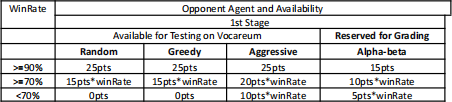
In the first stage, you will be graded by playing 20 times against each of the four existing AI players (random, greedy, aggressive, and alpha-beta) in the table below; 10 times as Black and 10 times as White. Note that when you click the “submit” button, your agent will play against only the random, greedy, and aggressive agents. The alpha-beta agent is reserved for grading.
Grading Rubrics for the 1st Stage (max 90 points)
Example:
- VS random player: win 18 games out of 20 games, WinRate=90% → 25 pts.
- VS greedy player: win 16 games out of 20 games, WinRate=80% → 15 * 0. 8 = 12pts
- VS aggressive player: win 14 games out of 20 games, WinRate=70% → 20 * 0. 70 = 14 pts
- VS alpha-beta player: win 11 games out of 20 games, WinRate=55% → 5 * 0. 55 = 2. 75 pts
So the total points for the 1st stage will be: 25 + 12 + 14 + 2. 75 = 53. 75pts.
The Second Stage (40 games, max 10 pts)
In the second stage, your agent will play against two high-performance agents, the Q-Learning agent and the Championship agent, 20 times against each, 10 times as Black and 10 times as White. Note that when you click the “submit” button, your agent will play only 10 games (5 games as Black and 5 games as White) each against the Q-Learning and Championship agents. The real grading against 20 games each will take place after the assignment due date. The grading schema is defined as follows:
Grading Rubrics for the 2nd Stage (max 10 points)
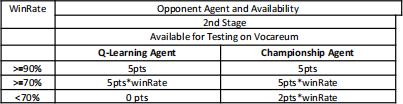
The format of input and output that your agent processes must exactly match that outlined below in Section 5.3. Otherwise, your agent will never win any game. The end-of-line character is LF (since Vocareum is a Unix system and follows the Unix convention).
5.3. Input and Output
Input: Your agent should read input.txt from the current (“work”) directory. The format is as follows:
- Line 1: A value of “ 1” or “2” indicating which color you play (Black=1, White=2)
- Line 2-6: Description of the previous state of the game board, with 5 lines of 5 values each. This is the state after your last move. (Black=1, White=2, Unoccupied=0)
- Line 7-11: Description of the current state of the game board, with 5 lines of 5 values each. This is the state after your opponent’s last move (Black=1, White=2, Unoccupied=0).
For example:
========input.txt========
2
00110
00210
00200
02000
00000
00110
00210
00200
02010
00000
=======================
At the beginning of a game, the default initial values from line 2 - 11 are 0.
Output: To make a move, your agent should generate output.txt in the current (“work”) directory.
- The format of placing a stone should be two integers, indicating i and j as in Figure 2, separated by a comma without whitespace. For example:
========output.txt=======
2,3
=======================
- If your agent waives the right to move, it should write “PASS” (all letters must be in uppercase) in output.txt. For example:
========output.txt=======
PASS
=======================
5.4. About Stages and Your Agent
All students shall submit their agent named my_player.xxx to Vocareum before the due date. The agent submitted to HW2->stage1 will be used for grading in the 1st stage. The agent submitted to HW2->stage2 will be used for grading in the 2nd stage.
For both stages, you are free to choose the AI methods you have learned in the class to build your agent. For example, you may choose to best implement the alpha-beta pruning for the 1st stage and then submit a Q-Learning agent for the 2nd stage. Or, you may build the best agent and use it for both stages.
To facilitate the learning process of your Q-Learning agent, you may use the Game Host to conduct as many training games as you like to train your Q-Learning agent and then submit the well-trained Q-Learning agent for grading. Training can not be performed on Vocareum servers, as there is a limit on how long a given script can run from a student’s terminal. Training should be performed on the student’s local machine.
2025-10-24