ART 107: Introduction to Digital Forms
Hello, dear friend, you can consult us at any time if you have any questions, add WeChat: daixieit
ART 107: Introduction to Digital Forms
Objectives:
· To take part in the basics of video editing.
· To explore the relationship between video and audio.
· To creatively use “found” footage to create a compelling video remix.
Final Product:
One 1 minute video using video from a selection of clips and the (found sound) audio of your choice.
Process:
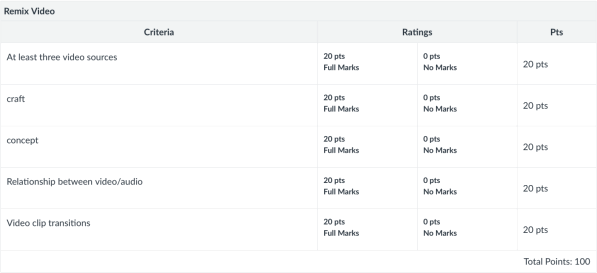
1. Choose at least 3 source videos.
You can use the provided videos, or you can add your own. If you add your own make sure they are 1080p resolution so you wont have to scale them and lose quality.
2.
3. Create a project in Premiere and edit the videos using the techniques demonstrated in class.
4. Lay in a soundtrack using at least 3 found sounds (not songs). Either use the sounds on the course website, or find sounds at https://freesound.org/Links to an external site. or any other creative commons sound resource website.
5. Export your video at 1920X1080px (1080p), Quicktime format using the H.264 video codec, OR H.264 format using the Vimeo 1080p HD preset. On a PC, .mp4 is fine.
6. Upload your video to Youtube (preferred) and share the link or upload the video to canvas. **If you upload your assignment to Canvas please follow this naming convention: LastnameFirstname_AssignmentName(and number 1 or 2 if need be).mp4 **
Concept:
When editing your video, think about how its meaning will be transformed by the audio you choose to include with it. Will the audio be appropriate for the visuals, or will the difference create a sense of tension or drama?
Clip log example:
1. cat.mov - The cat sets the stage, adding a sense of foreboding.
2. moon.mp4 - The moon adds drama and foreboding.
3. mouse.mov - The mouse presents a target for the cat.
4. dance.mp4 - They dance.
save as a document and cut and paste into text entry on canvas.
2025-10-21