16.1 Portfolio Project 1
Hello, dear friend, you can consult us at any time if you have any questions, add WeChat: daixieit
16.1 Portfolio Project 1
Portfolio projects are designed to showcase your problem-solving and coding abilities to future employers, mentors, supervisors, etc. You will translate the given specifications into a coded solution.
All coding should be done directly in zyLabs. This is an individual assessment. While you may brainstorm solution approaches with your peers, your code and comments should be done independently.
Due: Oct. 10, 2025 11:59 pm
Late submissions: -10% if submitted by October 11th 11:59 pm,-20% if submitted by October 12th 11:59 pm
No submissions will be accepted after 11:59 pm on October 12th. No extensions or replacement assessments will be given. All deadlines are set as MDT.
Learning Outcomes:
● Perform operations on dynamically-typed variables
● Accept and analyze user input
● Design control flow logic using data comparison
● Print formatted output according to given specifications
Specifications:
One of the primary functions of programming is to take large amounts of data and convert it to a form that is easy for people to understand and make decisions from. Think about modern fuel gauges in a car: the calculation combines information from how you drive, how much fuel is left and the fuel efficiency rate into a single number telling you an approximate distance you can travel until you run out of fuel.
For your first portfolio project, you will be creating a simulation program for a speed race. The program will take user inputs related to the car and race conditions and calculate the total time it would take for a selected car to complete a race under the given conditions.
Figure 16.1.1: Vehicle Specifications
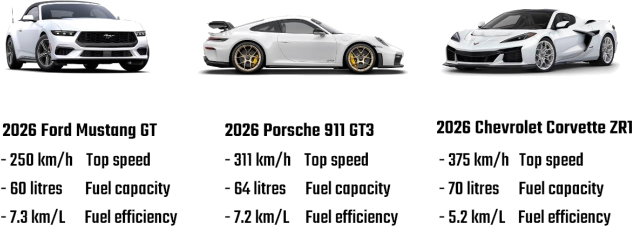
The program will require the following inputs from the user:
1. Car selection: Assume a positive integer format. The user should select a car from three available menu options where each car has different specifications.
Menu options: Ford Mustang = 1, Porsche 911 = 2, Chevrolet Corvette = 3
2. Driver selection: Assume a positive integer format. The user should select a driver from three available menu options where each driver has a varied level of recklessness that affects the race time.
Menu options: 1, 2, 3
3. Race distance: Assume a positive integer format entered as kilometers. The user should input the total distance of the race.
4. Road condition: Assume a string format where True=wet and False=dry. The user should specify whether the road conditions are wet or dry.
Using this information, vou will calculate the total amount of time it will take the car to complete the race. To do this, you will need tol calculate how long it will take the car to drive to the finish line based on its fuel efficiency, and add the amount of time it will take to refuell the car each time the tank has been depleted.
Assume that the cars cannot move and refuel at the same time. Additionally. cars must fill up to full fuel capacity before they can continuel moving, even if the tank doesn't need to be 100% full to reach the finish line. The car will only need to fill with fuel once its tank is completelyl empty. You may also assume that each car is filled up completely at the beginning of the race. Each refueling takes five minutes.
Additionally, you may assume that the cars will start at their top driving speed - meaning there is no acceleration to get to the top speed.
If the roads are predicted to be wet, you will need to multiply the total time by 1.2x to account for efficiency loss (including fuel time).
Your program should display the total time it will take for the chosen car and driver to complete the race under the specified conditions.
Impact of Input on Calculations:
Each car has a specific top speed (in km/h) and fuel efficiency that will impact its race time. Each car takes 5 minutes to refuel.
The selected driver's recklessness modifier may affect the likelihood of accidents, which could add time to the total race duration.
Driver 1 = 1.1x, Driver 2 =1.2x, Driver 3 =1.3x
A wet road will reduce the car's speed and increase race time by 1.2x due to reduced speed and control. The road modifier should be applied after the driver modifier.
Both modifiers should be applied to the total time (driving + refuel time).
Data Input, Output, and Handling:
Your input menu must prompt the user in the specified order and format
1. Car Number (1.2 or 3)
2. Driver Number (1,2, or 3)
3. Distance in km
4. Wet road status (True or False)
Your input menu must match the given example below. You must match the specified capitals, spelling, spacing, and punctuation exactly.
Your program must display the results using the print statement included in the starting Python template. Any changes to user input/output may result in your code not passing the automated calculation tests.
Your final calculation should be rounded to the nearest tenth. Rounding should occur at the end of the program.
You mau onoumo thot anhu nonitlue letonore loa 2 Ac0 oto)ond otrinno io Teuo ond "Coloo uuill oiuon on innut iftho oor or druon number cannot he recoonized (e n not 1 2 or 3) then vou should nrint the messane 'Innut numher not recoonized' and the nrooram will end. You must match the specified capitals, spelling, spacing, and punctuation exactly.
You do not need to test for any other validity except for the Car Number and the Driver Number.
Your code should include at least two different types of branching logic blocks (e.g. single if statement, if/else, or if/elif/else/etc.). You wil lose marks for redundant logic that repeats itself (i.e. checking multiple if statements when one if/else would be sufficient).
Your code must follow the conventions discussed so far in the course (names_with_underscores, four spaces for indentations, spacesl between variables/operators, comments throughout, etc.)
You may not use any built-in Python functions or external modules including exit() or other program termination functions.
Assessment Submission:
A template file named race.py is provided as a starting point. Add your code directly to that file. You must do your work within the ZyLabs coding environment.
The final submitted file must be named race.py. Be sure to test your code execution via the terminal and remember to press "Submit forl grading" when you are done. You may modify and resubmit your code as many times as you'd like before the deadline. You will see somell tests performed against your code-this is only part of your grade. The remaining elements will be graded manually by a TA. A detailed rubric is provided at the end of this page.
Frequently asked questions/answers will be provided via the D2L discussion boards. You should double-check your solution against the answers posted there before submitting.
Tips:
Start with a logic flowchart.
Use comments to map out your pseudocode (see the branching logic tutorial video on D2L).
Don't rely on the automated tests to determine if your program is working! Do the calculations yourself and test via the terminal input.
Commenting out specific code sections/statements can help you isolate the problem.
If any of your menu input output does not match the example screenshots below exactly, the tests will fail.
Don't wait until the last minute to get help!
2025-10-13