INFO90002 S2 2025 Assignment 2 - SQL
Hello, dear friend, you can consult us at any time if you have any questions, add WeChat: daixieit
INFO90002 S2 2025
Assignment 2 - SQL
Due: see LMS
Submission: Via the Canvas LMS
Weighting: 10% of your total assessment (Graded out of 200 marks)
Flight Management Co
Flight Management Co (FM Co) is a US-based travel company that handles all aspects of domestic air travel across the United States. The company manages a comprehensive flight booking and scheduling system that captures flight operations, staff assignments, and passenger bookings associated with several airlines providing internal US flights.
Every airport in the system is identified using a unique 3-letter IATA code, such as LAX for Los Angeles and JFK for New York. These codes are widely used across the aviation industry to identify airport locations.
Similarly, airlines are recorded using their unique 2-letter IATA codes, which are incorporated into flight numbers. For example, a flight number like AA203 indicates that it is American Airlines Flight 203.
Each flight in the system refers to a single scheduled trip between two airports, operated by a specific airline, and assigned a flight number and departure schedule. Flights can be either direct or part of a multi-leg journey. When passengers book long-distance travel (e.g. New York to San Francisco), they may be assigned multiple connecting flights, such as New York to Dallas followed by Dallas to San Francisco. These flights are booked together under a single booking, meaning a booking may span multiple flights.
At this stage FM Co manages details of bookings made by US residents only.
Each flight is operated by assigned staff, including pilots and cabin crew, who are managed through flight staff allocations. Aircraft used for flights are tracked, along with their models and operational details.
You are provided with the part of the database that stores data only on completed flights.
Note, the provided database may have deviations from how such a database is designed in real world.
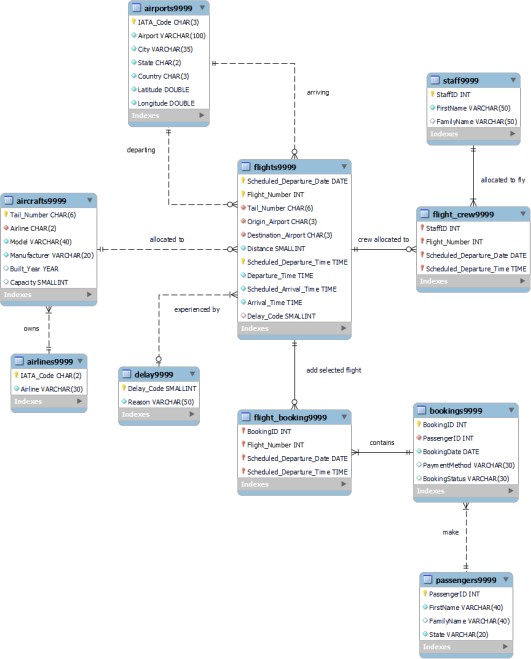
Figure 1. Data Model for FM Co
Instructions
1. Rename all tables to have the last 4 digits in table names the same as the last 4 digits of your student ID
• Download the files named A2Script_2025s2_LOCAL.sql and A2Script_2025s2_ENG.sql from the LMS.
• Open each file in a text editor, e.g. in MySQL Workbench, Notepad, Notepad++ or some other text editor
• Change all occurrences of 9999 to the last 4 digits of your student ID (one way to do this is to perform a find and replace). For example, if your student ID is 12349876, your tables will get renamed as team9876, flights9876, flight_booking9876, etc.
Make sure you rename tables in BOTH sql files.
Note, if renaming is not done, you cannot get full marks, a heavy penalty of 50% will be applied.
2. Run the relevant script on the engineering server (and / or on your local MySQL server). This will create all required tables and populate them with data. Note on the local server you will have the database flight_management, while on the engineering server you will only have a collection of tables (possibly mixed with tables from your previous exercises because students do not have permissions for create database and create schema commands execution).
3. Type the following SQL statement and execute it.
SELECT '123459999' as StuID, al.*
FROM airlines9999 al
(Note that in the above statement 123459999 should be replaced with your Student ID and occurrences of 9999 should be replaced with the last 4 digits of your student ID, as in step 1 above)
Notice how each row contains your student id and all attributes from the airlines9999 table.
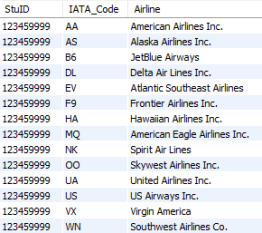
You must include your student ID in all SELECT queries. 10% will be deducted from each task where this requirement is not satisfied.
It is expected that
• your script will produce correct results
• your code meets standards of quality as discussed in lectures
• your code runs on the university engineering server
The Task
For each question, write a single SQL statement. Do not use inline views / schema on read, views unless explicitly instructed to do so. Views, inline views and schema on read will earn 0 marks. Only question 11b is expected to use a view (not inline view).
If your result set is less than 10 rows, show ALL results. If it is longer, show at least 10 rows. Specify how many results were returned in red font under the screenshot.
Note the default setting in Workbench is 1000 records, even if there are many more in a table. So you may need to increase the limit, especially if you get exactly 1000 records returned.
Questions
1. List all flights by 2 airlines: American Airlines Inc. and United Airlines Inc. For every listed flight, your results should show IATA code and flight number. Within each IATA code the list should be sorted by flight number (default setting, i.e. ascending). (15 marks)
2. List all flights that flew in the current year, i.e. 2025. Your list should show IATA code and flight number as one value (e.g. AA16), and scheduled departure date and time. The list should be sorted by flight number within airline code. Note, the code should work in the future years. (15 marks)
3. List all flights with the delay longer than 1 hour. Your list should show IATA code and flight number as one value (e.g. AA16), scheduled departure date and time, and the duration of the delay. The list should be sorted by time delay in descending order.
Hint: explore the function TIMEDIFF(). You compare time stamps like strings, e.g. if you want to know whether a value equals 5 seconds, you will write ='00:00:05' (20 marks)
4. Find the longest flight(s). Your list should show airline IATA code and flight number as one string (e.g. UA97), departure and arrival airports’ IATA code, scheduled departure time and distance. (20 marks)
5. List bookings that contain more than 1 flight. Your result set should list the booking IDs and number of flights in the booking, ordered by Booking ID. (15 marks)
6. List passengers from Florida (FL) who have bookings to fly from an airport in the same state where they live. Your list should show passenger full name as first and last name separated by space, IATA code and city of the departure airport. The list should be ordered by Full name and the IATA code. (20 marks)
7. List all aircrafts that are not allocated to any flights. Your list should show tail number, aircraft model, and airline IATA code and name. Order by aircraft model within each airline IATA code. (20 marks)
8. List all flights where city of the origin airport and city of the destination airport start with the same letter (e.g. origin airport city Augusta and the destination airport city is Atlanta - both start with A). The results should include IATA code and city of the origin airport, IATA code and city of the destination airport and scheduled departure date. The list should be in the order of IATA codes of origin airports. (25 marks)
9.
a. Add yourself as a staff member. Staff ID is your student ID. Provide the SQL statement that will create this record.
b. Add records to allocate yourself to at least 3 flights (your choice of flights). Provide the SQL statement(s) that will create the data. (5 marks)
10. List yourself as a staff member with all fields including staff ID (which is your student
ID), full name as first and last names separated by space, departure airport IATA code and city, scheduled departure date and time. This is the only SELECT statement where you do not need to start with StuID. (15 marks)
11.
a. Write the SQL DDL to create a view that counts the number of flights completed by each staff member. Your list should include staff id, full name as first and last name separated by space and number of completed flights.
Do not include StuID in this view.
In addition to the code, you need to provide 2 screenshots
- the list of tables and views from the left pane of Workbench showing your created the view and
- the results of running SELECT from your View (we recommend explicitly showing the SELECT statement used to create the View). (15 marks)
b. Using the View you created in Task 11a, list the staff members who completed the lowest number of flights. Your results need to display staff id, full name and the corresponding number of flights.
You must include your student ID in task 11b. (15 marks)
Submission Details:
Submit a single PDF showing your answers to all questions
Please make sure that you actually submit your file on LMS. After uploading the file, click on ‘Submit Assignment’ to actually submit your file. If you submit late because you failed to press the submit button and only noticed this after the deadline, your submission will be considered late just like any other late submission to maintain fairness for all students.
Specify your student name and ID at the top of your answer document.
Formatting requirements for your submission
For each question, present an answer in the following format:
• Show the question number and question in black text.
• Show your answer (the SQL statement) in blue text (DO NOT use a screen shot)
• Show a screenshot of the result from Workbench. If your result set is less than 10 rows, show ALL results. If it is longer, show at least 10 rows (few rows extra is allowed).
• Show how many rows were actually returned, in red text.
• Remember to include your student ID (the only exception is q.11a).
• Show each query on a separate page.
• You must not use in-line views, schema on read, views for questions unless explicitly instructed to do so (Q11b only can use a view).
• We may be testing your code on the engineering server so make sure you install the database and test your answers on the “engineering” MySQL server.
Example:
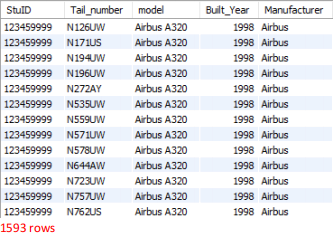
Q.XX List all aircrafts manufactured by Airbus. Your list should show tail number, model, year of manufacturing and manufacturer ordered by the year.
SELECT '123459999' AS StuID, Tail_number, model, Built_Year,
Manufacturer
FROM aircrafts9999
WHERE Manufacturer='Airbus'
ORDER BY Built_Year
2025-09-20
Database Systems & Information Modelling