Create a simple version of the classic arcade game called Centipede.
Hello, dear friend, you can consult us at any time if you have any questions, add WeChat: daixieit
Objective:
To understand and apply the principles of 2D graphics and class creation in C++.
Description:
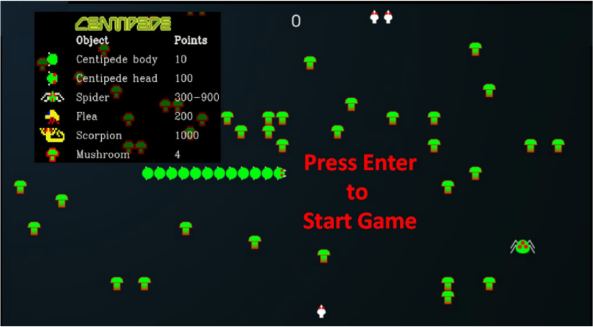
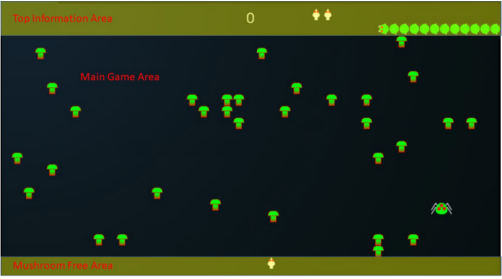
Create a simple version of the classic arcade game called Centipede. An online version of the game can be found at (https://www.mysteinbach.ca/gamezone/2153/atari-centipede/). The goal of the assignment is to try to reproduce the game play present on the listed web site. You only need to support the first level and the game ends when either all the centipede body elements are destroyed or the player runs out of lives. The game screen is made up of three section (1) the topl information area, (2) the main game area and (3) the bottom mushroom free area, as seen below. The game score is shown in the middle of the top information area and the number of remaining live is show by the number of starship icons. The centipede starts in the lower right part of the top information band. The centipede is made up of 11 body sections and one head section. Reproduce the action of the centipede asl shown in the game on the website. You only need to support the spider in your version of the game.
Game specifics:
1. Create an ECE_Centipede class derived from the SFML::Sprite.
a. The class is responsible for calculating the location of all the segments of the centipede and which segments have broken apart into new centipedes with its own head.
b. The class is also responsible for detecting collisions with other objects and taking the appropriate action.
2. Use the random number generator (std::uniform int distribution) to randomly locate 30 mushrooms in the main game play area. Use a std::list to maintain the state and location of the mushrooms. Feel free to use either a class or struct to hold the information.
3. Create an ECE LaserBlast class derived from the SFML::Sprite that calculates the current location of the laser blast and detecting collisions with objects and taking the appropriate action. Make sure to allow for the movement of multiple laser blasts by using a std::list.
4. Each time a mushroom is hit by the laser blast change the image to the ones provided. As the mushroom is hit the lower part disappears until it is hit twice and is removed from the game.
5. Use the left/right/up/down arrow keys to move the spaceship and use the space key to fire a laser blast.
6. Keep track of the score and the number or remaining lives and display it at the top of the screen.
7. When the game is over just go back to the Start screen.
Turn-In Instructions
Create your assignment in a folder called Labl at the same level as the Chapterxx folders in the "Beginning Cpp-Game-Programming-Second-Edition". Inside your Labl folder create a CMakelists.txt file that will be used to build your assignment for testing. Inside your Labl folder create a code folder to hold any .cpp and h files you create to complete your assignment. Also, inside your Labl folder create a graphics folder to hold any graphics needed by your game.
Grading Rubric:
1.(10 pts) Main start screen is shown at startup and pressing the enter key starts the game.
2. (20 pts) The 30 mushrooms are randomly placed in the main game area.
3. (15 pts) The starship starts at the center of the bottom of the game and the starship is moved around by pressing the left/right/up/down keys.
4. (10 pts) Pressing the space key fires laser blasts. Multiple laser blasts need to be supported and collisions need to be correctly handled.
5. (10 pts) The spider moves randomly around the main game area. When a spider collides with a mushroom, the mushroom is destroyed. When the spider collides with the starship, the starship moves back to the starting location and a life is used up.
6. (20 pts) The centipede moves correctly through the mushrooms and a segment is destroyed when hit by a laser blast and is divided, if hit in the middle creating a new smaller centipede.
7. (15 pts) The game play is fun with the individual components moving at reasonable speeds and collision correctly detected
2025-07-01
To understand and apply the principles of 2D graphics and class creation in C++.